7 How it fits together 
- The base and the features
- From login to desktop
- What
vikix updatedoes - Whose file is it
- Themes
- Snapshots
7.1 The base and the features 
install.sh (or the one line, curl -fsSL https://vikix.dev/install | bash) installs the base: StumpWM and the bar, a terminal, Firefox and a file manager, sound, Wi-Fi and Bluetooth, the laptop’s hardware, screenshots, themes, backups, and the AI agent. Then you reboot, and the desktop starts.
Everything else is a feature, added when you want it:
- What there is:
features.listin the checkout names each feature and the package lists it brings;bundles.listgroups them (essentials,developer,everything). A package list no feature names is part of the base.vikix featuresshows them all, with the ones you have marked. - What you chose:
~/.config/vikix/features, one name a line.vikix addandvikix removekeep it; it’s one of your files, so it has an undo too../install.sh --with essentialsadds them in the same run as the install. - Single programs:
vikix pkg add NAMEandvikix pkg drop NAME, for what isn’t a feature. A package Vikix’s lists name that you drop goes on~/.config/vikix/packages-skip, so updates leave it out. - Some set themselves up: a feature can be a setup command rather than packages.
local-ai,llm,dictation,voice,notes,windowsand the other agents (opencode,codex,gemini,antigravity,aider) each run one (vikix ai setup,vikix dictate setup…), which fetches what it needs as you, mostly into~/.local;vikix removeruns its uninstall.features.listnames each one’s commands. - Where they show: Super+m leaves out entries for features you don’t have (JupyterLab, Printers, Windows, local AI, dictation …), Super+m → Apps shows the programs of the app features you added (video, graphics, study …), and the welcome at your first login (
vikix welcome) has a picker for them.
7.2 From login to desktop 
There is no login screen. You log in on the text console, and on tty1 the desktop starts by itself. The other consoles (Ctrl+Alt+F2 …) stay plain text, so if the desktop ever won’t start, you can still log in there and fix it.
login on tty1
  └─ ~/.bash_profile          the "vikix startx" block: on tty1, with no X yet, exec startx
      └─ ~/.xinitrc           Vikix's: runs vikix-session inside dbus-run-session
          └─ vikix-session    everything that lasts as long as the desktop; its output goes to
              │               ~/.local/state/vikix/session.log
              ├─ INFOPATH, so Emacs and `info` find the Vikix manual
              ├─ .Xresources, the keyboard, screen layout (autorandr), the wallpaper
              ├─ ssh-agent, one for the whole session
              ├─ pipewire, dunst, clipmenud, udiskie (USB drives), picom
              ├─ idle times, night light, the locker (xss-lock → vikix-lock)
              ├─ the Emacs daemon (with the feature emacs), the battery warner, the update checker,
              │  the polkit password box
              ├─ the Network Office watcher: discovery at joins only for networks you enabled
              ├─ Ollama, for local AI models, once `vikix ai setup` installed it
              └─ ~/.local/bin/stumpwm             the last line; when it exits, the session ends
                  └─ ~/.stumpwm.d/init.lisp
                      ├─ vikix/errors.lisp       when something fails, ask what to do
                      ├─ vikix/theme.lisp        colours and fonts
                      ├─ vikix/groups.lisp       workspaces 1–9, more by name
                      ├─ vikix/registry.lisp     every command once: its key, its place in Super+m
                      ├─ vikix/commands.lisp     Vikix's commands and the Super+m menu
                      ├─ vikix/windows.lisp      focus, gaps, layout undo
                      ├─ vikix/rules.lisp        rules for windows: (when-window ...)
                      ├─ vikix/viri.lisp         a workspace that scrolls sideways
                      ├─ vikix/drawer.lisp       a few everyday programs at the screen's edge
                      ├─ vikix/layouts.lisp      saved layouts
                      ├─ vikix/overview.lisp     every workspace drawn small (Super+o)
                      ├─ vikix/resume.lisp       your windows back after a restart
                      ├─ vikix/day.lisp          what had the screen, noted for vikix day
                      ├─ vikix/why.lisp          why did that happen? what the desktop did, and what made it
                      ├─ vikix/what.lisp         what is this? the bar's field under the pointer, or the window in front
                      ├─ vikix/used.lisp         what gets used: the keys and commands, counted for vikix used
                      ├─ vikix/keys.lisp         binding the Super keys, and the rule they keep
                      ├─ vikix/help.lisp         Super+/ and Super+F1
                      ├─ vikix/webapps.lisp      your web apps: their keys and Super+m entries
                      ├─ vikix/modeline.lisp     the bar
                      ├─ vikix/rescue.lisp       a way out when the desktop is stuck: a watcher, Super+Ctrl+Alt+Escape
                      ├─ vikix/door.lisp         an agent's Lisp walked against one list before it runs; what fails waits for you
                      ├─ vikix/swank-guard.lisp  a wrong or missing password can't take Swank down
                      ├─ vikix/swank.lisp        Swank on 127.0.0.1:4004 (with a password), for Emacs and `vikix eval`
                      └─ vikix/socket.lisp       Vikix's own socket beside it, `$XDG_RUNTIME_DIR/vikix.sock`: `vikix eval`'s first road
                      ├─ rules.lisp              yours: your rules for windows, when you have any
                      └─ user.lisp               yours, last
Each file in that list is loaded on its own, a piece (a form) at a time. If one piece has a mistake, a small menu asks what to do: skip that piece and load the rest, open the file at that line in Emacs, or, for user.lisp, load your last snapshot of it instead. So a typo in user.lisp costs only that line, never your desktop. Errors StumpWM itself doesn’t catch (in a timer, say) used to restart the whole desktop; now the menu offers to carry on first. See When the desktop asks what to do.
Vikix’s own files are compiled once and kept, in ~/.cache/vikix/fasl/: the first load after a file changes reads it from its text, as described, and compiles it in the background; from then on it is loaded from the compiled copy, which takes a fifth of the time, until it changes again. A copy belongs to the file’s text and to that of every file before it in the list, so a change early in the list has the later ones compiled again too. errors.lisp, registry.lisp (whose commands know the line they’re written on), the plugins’ files and yours are always read from their text. A copy that fails is thrown away and the text loaded, so a mistake never costs more than it did. vikix times files shows the last load file by file.
The bar’s words (the volume, the network, Bluetooth, Dropbox ...) are asked of small programs every ten seconds by a thread of their own, not by StumpWM’s main one: a program that is slow to answer delays its own word in the bar, never your keys. The same goes for a command that wants a program’s answer (do not disturb, the night light, the agents’ list, a rule written after a snapshot): the program runs in a thread of its own, and the desktop goes on until the answer is there.
At the very first login, StumpWM also opens the welcome (vikix welcome, in a terminal): add software, the keys that matter, a theme, the keyboard layout, the guide. Once it has been shown, it only comes back from Super+m → Welcome.
Why no systemd user services: Void uses runit, which runs system services only. Programs that belong to your desktop session are started by vikix-session and end with it. To start one of your own with the desktop, see startup programs.
StumpWM is a running Lisp program. Its settings aren’t read from a config file once; they are Lisp code it runs. So after editing user.lisp, tell it to run the files again: Super+m → Reload config. You can also change it while it runs, without a file: vikix eval '(message "hi")' from a terminal, or a REPL from Emacs (M-x slime-connect, 127.0.0.1, 4004).
7.2.1 How vikix eval reaches StumpWM 
For the curious: vikix eval is a small Python program that talks to StumpWM over a socket. Your code never runs in the Python program; it’s sent across and run inside StumpWM itself. Its first road is Vikix’s own socket, $XDG_RUNTIME_DIR/vikix.sock (socket.lisp): a file only you can open, in a folder that is yours alone, so nothing is sent to prove who you are. A thread of Vikix’s answers there: a form that only reads the desktop’s state (which windows are where, what a key runs, the rules) goes to the main thread first, so it follows the work already there. If that thread is sleeping without answering, as it does in a menu, the socket thread answers the read instead. A thread waiting for CPU time gets more time to answer; missing observations do too. At the deadline, a read that has not started can still be answered by the socket thread; one already running reports a timeout rather than running twice. Anything that acts or draws stays on the main thread, the one that owns the X connection, so it can touch windows and the bar safely. Without that socket (a session without elogind, or a desktop from before it), vikix eval talks to StumpWM the way Emacs does, over Swank, and everything runs in the main thread:
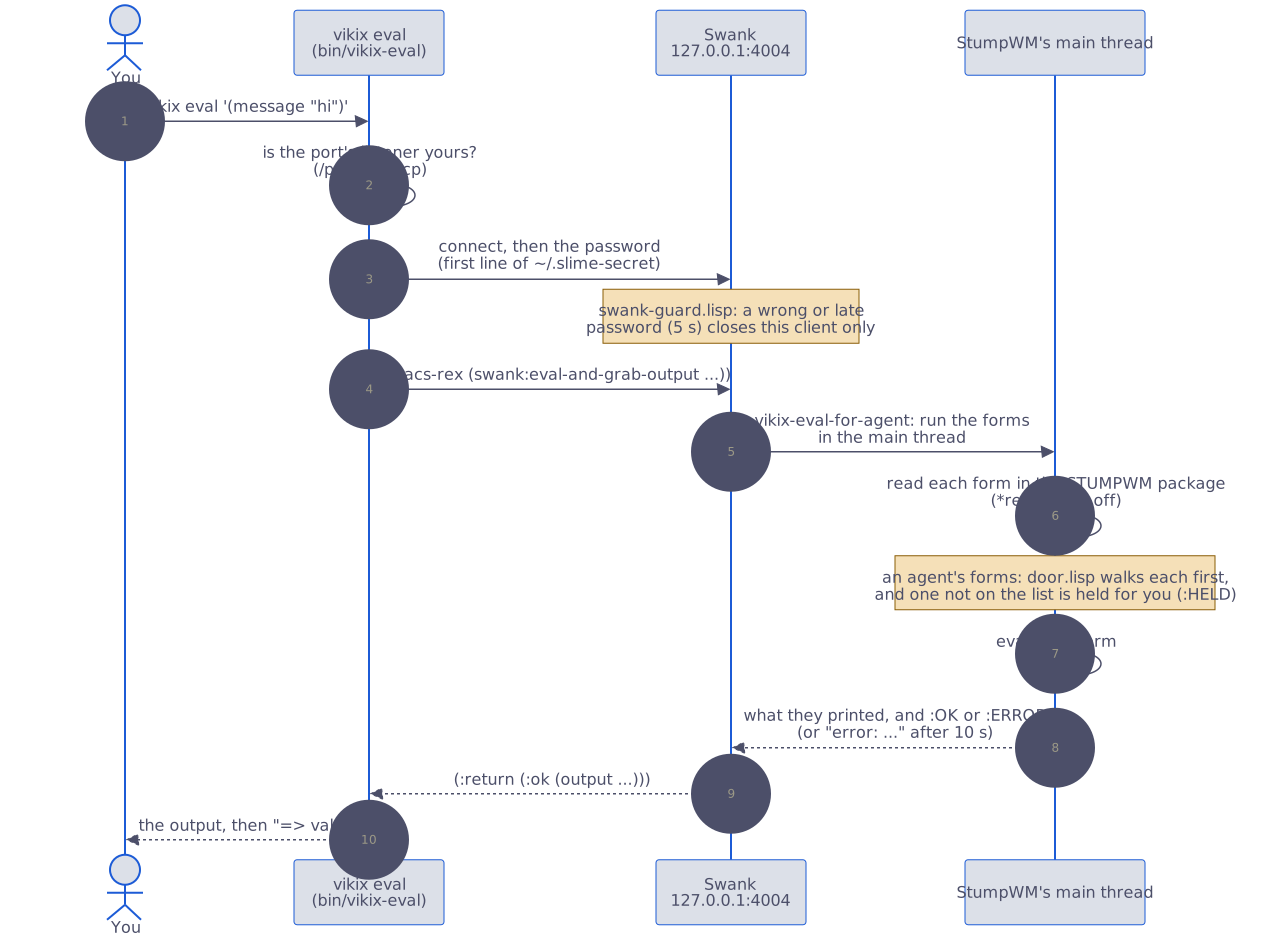
Two things keep it safe. The password in ~/.slime-secret means only you can run code there, and swank-guard.lisp makes sure a client with a wrong or slow password is turned away without taking Swank down. And if StumpWM is busy (a menu is open, say), vikix eval gives up after 10 seconds with a message, and the code never runs later by surprise. It also looks at who owns the port before it sends the password: if the listener on 4004 is another user’s (your StumpWM isn’t running, and someone else took the port), it stops there. And when the sender is an agent (vikix eval under Claude Code or another agent, or the MCP server’s eval), the forms pass the door first (door.lisp): read without running anything, walked, and run only when every function they call is on the door’s list; the rest waits for you under Super+m → Door (AI).
7.2.2 How vikix mcp reaches it 
For the curious: vikix mcp register gives your agent the desktop as tools (Working with AI). The server is bin/vikix-mcp, a Python program with nothing but the standard library. It doesn’t listen on the network: the agent starts vikix-mcp serve itself and talks to it over its stdin and stdout, one JSON-RPC message a line, so only that agent can use it.
- Looking:
desktop,keysandrulessend fixed Lisp forms throughvikix eval, the path above, and StumpWM answers in JSON.doctor,history,changesandthemesrun thevikixcommand, and what comes back goes through the same scrubber asvikix debug(lib/debug-report.py) before the agent sees it;versionreads the checkout’sVERSION. - Acting:
set_theme,switch_workspaceandfocus_windowcheck what the agent asked for against the desktop first (a theme there is, a workspace that exists, a window number on it). Only that checked value reaches Lisp, as an escaped string, or a command, as one argument; never a shell.run_commandtakes the name of one of the desktop’s commands, and the desktop itself decides:registry.lispholds every command with its key and its place in the menu, and runs for an agent only those marked:agent tthere (vikix-agent-run);commandslists them. So an agent is never offered a command the desktop doesn’t have. - Keeping a record: every call, refused ones too, goes into
~/.local/state/vikix/mcp.log(600), with long arguments cut and secrets taken out. - Staying current: before it reads each request, the server compares its own files (
bin/vikix-mcp,lib/debug-report.py,VERSION) with how they were when it started. Whenvikix updatehas changed them, and they compile, itexecs the new version in the same process, with the request still waiting in the pipe, and tells the agent its tools may have changed.
7.3 What vikix update does 
- Pulls Vikix into
~/vikix, then starts again from the new version of itself. Which commits it takes is the channel, one word in~/.config/vikix/channel:good(the default) is the tag GitHub’s tests move to the last commit of main they passed on, so a machine never takes an untested commit and lags main by one test run (about ten minutes);maintakes every commit as it lands, for the machine Vikix is developed on. Ongoodthe update says how many commits of main are still waiting for their tests. The bar’s update count (vikix-updates) counts to the same place. - Updates Void:
xbps-install -Su, xbps itself first. - Runs six install stages again, each safe to repeat:
10-packages: installs anything new in the base’s lists and your features’ lists, leaving out your skip list20-services: switches on services new packages brought40-config: links Vikix’s files again, copies starters you don’t have yet, writes the theme files again, makes these guides into the Info manual and the web pages, and takes a snapshot of your files45-editors: for the editors you chose, pulls Emacs’s config and reloads Vikix’s AI setup in an Emacs that’s running (your chats stay open), and moves Neovim’s plugins on when Vikix tested newer ones (unless you moved them yourself)65-languages: for the languages you chose: PicoLisp, Lazarus, Julia67-dev: the~/devREADMEs, new examples, and~/dev/aiwhereuvis
- Runs migrations: one-off fixes for machines installed before some change, each run once (recorded in
~/.local/state/vikix/migrations/). - Brings
llmto its pinned version, if you have it (vikix ai llm). - Upgrades your own programs: what you installed with
pipx(pipx upgrade-all), withuv tool install(each one but Vikix’s pinnedllmand Piper), and withcargo install(whencargo install-updateis there:cargo install cargo-update, once). Go can’t upgrade everything it installed; rungo install NAME@latestagain for each. - Reloads StumpWM, so new keys, the bar and the menu work at once; the screen says which version runs now (
Super+m→ Reload config says the same). - Checks the update before calling it a success: asks the StumpWM image whether it starts (without a screen, as a rebuild asks a new one), that Vikix’s links point into
~/vikix, and whatvikix doctorfinds. An image that doesn’t start or a link gone astray ends the update in failure, withvikix update --backas the way back; the doctor’s findings are counted and listed, since they may be older than the update.vikix update checkruns the same by itself.
7.3.1 One part at a time 
vikix update does all of the above. When you only want one part:
vikix update core     # Vikix only: steps 1, 3 (10-packages, 20-services, 40-config), 4, 7 and 8. Seconds.
vikix update check    # step 8 alone
vikix update system   # Void's packages only: step 2
vikix update tools    # 45-editors, 65-languages, 67-dev, then steps 5 and 6
Core still installs a package new to Vikix’s lists (a release that needs a new program works), but updates nothing else of Void’s. Programs from cargo install and go install are on your PATH (~/.cargo/bin, ~/go/bin), from the block in ~/.bash_profile.
An agent’s vikix mcp server that’s already running notices the new version by itself and runs it from its next call, so the agent doesn’t need to reconnect.
A stage that fails doesn’t stop the rest; they are named at the end. The whole run is logged in ~/.local/state/vikix/logs/update-<time>.log.
It asks for your sudo password once. It never asks for anything else, and it never changes your files: only Vikix’s links, the files it writes for you, and the marked blocks in ~/.bashrc and ~/.bash_profile.
The bar says updates 12 (Void packages), Vikix update, or both, when there is something to bring. vikix-updates checks a minute after login and then every 6 hours. On the main channel it also asks GitHub how its tests went on the commit this machine runs (every ten minutes while they run): the bar says tests failed when they failed, and a notification says it once, since a main machine took that commit before its tests. It clears when a commit that passed is installed, or with vikix update --back. On good nothing is asked: what runs has passed.
7.4 Whose file is it 
This is the rule everything else follows.
- Vikix’s files are symlinks into
~/vikix. That’s how an update reaches them: the pull changes the file, and every link sees the change. It’s also why you shouldn’t edit them. The edit would change the checkout, and the next pull would refuse to overwrite it. - Your files start as copies of Vikix’s starters. After that they are yours: no update changes them, even when Vikix’s starter changes. When a change must reach existing copies (a new include line, say), a migration makes exactly that change and nothing else.
- Marked blocks. A few shared files, like
~/.bashrc, have blocks Vikix owns between# >>> vikix NAME >>>and# <<< vikix NAME <<<. Vikix rewrites the inside of its blocks, and nothing else in the file. - Nothing is deleted. A file that’s in the way of one of Vikix’s links is moved to
NAME.vikix-bak.<time>.
The way to change something of Vikix’s is to override it from one of your files. The one for the desktop is user.lisp, which loads last: bind a key again, set a variable, redefine a command. Making it yours has examples.
7.5 Themes 
A theme is a small file of named colours (~/vikix/themes/vikix-dark.theme). vikix theme NAME does three things:
- saves the name to
~/.config/vikix/theme/current - writes each program’s colours into
~/.config/vikix/theme/(alacritty, kitty, rofi, the lock screen) and~/.config/dunst/dunstrc.d/10-vikix-theme.conf - repaints StumpWM, reloads dunst, and sets the theme’s wallpaper, if you chose to follow the theme (the wallpaper cycles otherwise)
Your own configs include those written files. So the theme’s colours come in, and anything you set after the include wins. That’s how the theme reaches your files without Vikix editing them.
7.6 Snapshots 
Your files (listed in ~/vikix/config/yours.list) have a history in ~/.local/state/vikix/yours.git. A snapshot is taken after every install and update (and again once Neovim’s starter is in place), before every AI agent session (Super+a, and an agent an editor starts), and whenever you run vikix snapshot. vikix undo puts your files back as they were one snapshot ago, and is itself a snapshot, so a second undo reverses it.
A folder in the list that is a git clone of its own, such as a Neovim config you brought, is left out: it has its own history. API keys are never recorded, whatever the list says.
It covers your settings, not your documents. For those, vikix backup.